


What Is a Self Service Portal Anyway

Picture your customer support team as a fire department, constantly scrambling to put out fires by answering the same simple questions over and over. A self-service portal is your fire prevention system. It gives customers the tools to handle common issues themselves, stopping small sparks from turning into full-blown emergencies.
This marks a huge shift in customer service philosophy. Instead of funneling users into reactive channels like phone calls or emails, you're giving them a proactive, self-sufficient path forward. And this isn't just about cutting costs; it's a fundamental upgrade to the customer experience that people now expect.
More Than Just a Glorified FAQ Page
It's a common mistake to see a self-service portal as just a static FAQ list. A truly effective portal is a dynamic, interactive hub where people can take real action. It’s the difference between a library with no librarian and one where every book is easy to find, and you can check out whatever you need on your own.
The real goal is to move beyond just handing out information and toward genuine empowerment. This strategy pays off in several big ways:
- Increased Customer Satisfaction: Study after study shows that most customers would rather find answers on their own before reaching out for help. A well-designed portal meets this demand head-on.
- Reduced Agent Workload: By deflecting all those common, repetitive questions, you free up your support agents to tackle the complex, high-value issues that actually need a human touch.
- 24/7 Support Availability: Your portal never clocks out. It provides solutions around the clock, which is a lifesaver for customers in different time zones, all without the overhead of a 24/7 support team.
A self-service portal transforms customer support from a cost center into a strategic asset. It simultaneously reduces operational expenses while building customer loyalty and independence.
This idea isn't just for external customers, either. Many companies now use an employee self service portal to handle internal HR requests and IT support, proving just how versatile the model is.
Ultimately, a self-service portal is an investment in both efficiency and your customer relationships. It shows you value your customers' time by giving them the freedom to solve problems on their own terms. In doing so, you build a more scalable support operation and foster a stronger sense of loyalty—a win-win for your business and the people you serve.
Building the Foundation with Core Features

A powerful self-service portal isn't just a random collection of tools; it's a carefully designed ecosystem where every feature works together to create a smooth, intuitive user journey. Think of it like building a house. You wouldn't just dump a pile of bricks on a plot of land and hope for the best. You need a solid foundation and a clear blueprint so everything fits together perfectly.
That foundation is built on a handful of non-negotiable core features. These are the pillars that transform a simple webpage into a dynamic hub that truly empowers your customers. Going beyond a basic checklist, understanding the why behind each feature is the key to unlocking its full potential. Let’s break down these essential building blocks.
The Intelligent Knowledge Base
The heart and soul of any self-service portal is its knowledge base. This is so much more than a static FAQ page. It needs to function like an expert librarian, instantly surfacing the exact information a user is looking for without making them hunt for it.
An intelligent knowledge base uses smart search, tagging, and intuitive categorization to deliver the right articles, guides, and tutorials at the right time. For a SaaS company, this could mean step-by-step instructions for a complex new feature. For an e-commerce brand, it might be a detailed guide on how to process a return.
The goal is to answer a user's question before they even have to ask it. A well-organized knowledge base is the single most effective tool for ticket deflection, directly reducing the burden on your support team.
By making information accessible and easy to digest, you empower users to solve their own problems on their own time. This not only improves their experience but frees up your support agents to handle the more complex, high-value interactions that genuinely require a human touch.
Secure and Personalized Account Management
While a knowledge base provides the answers, the account management dashboard provides the control. This is the secure, personal command center where customers can manage their profiles, view their history, and take direct action without ever needing to contact support.
Here's what a robust account management dashboard should deliver:
- Order and Subscription Management: Let customers view past orders, track current shipments, or modify subscription plans with a few clicks.
- Billing and Invoice Access: Give them a secure place to download invoices, update payment methods, and review their entire billing history.
- Personal Information Updates: Allow users to easily change their contact details, update passwords, or adjust their communication preferences.
This level of control fosters a sense of independence and trust. When customers can efficiently handle their own administrative tasks, their reliance on your support team for routine requests plummets, leading to significant operational savings.
Intuitive Case Submission and Tracking
Let's be realistic—even the best self-service portal can't solve every single problem. When a customer does need to reach out, the process should be just as smooth and transparent as finding an article in the knowledge base. This is where intuitive case submission and tracking comes in.
A clean, simple form should allow users to submit a support ticket with all the necessary context. But even more importantly, the portal must provide a real-time view of that ticket's status. Imagine ordering a package and never getting a tracking number—the uncertainty alone is frustrating. The same principle applies here.
Providing visibility into the support process—from "Received" to "In Progress" to "Resolved"—reassures customers that their issue is being handled. This transparency prevents those repetitive follow-up emails and calls asking for updates, which further reduces agent workload and helps manage customer expectations. A great portal makes seeking help a structured, visible, and painless process.
Designing a Portal People Actually Want to Use
Let's be honest: the most feature-packed self-service portal in the world is completely useless if people find it a pain to use. A clunky, confusing experience will send customers running for your support lines—the very thing you're trying to avoid. The real goal is to build a portal that people don't just tolerate, but actually prefer to use.
Think about the difference between a well-organized retail store and a chaotic warehouse. In the store, you expect clear aisles, logical signs, and an intuitive layout that helps you find what you need. Your portal needs to deliver that same feeling of effortless navigation.
Creating an Intuitive Digital Storefront
A portal's design is its first impression, and you only get one shot. The visual layout and navigation are the digital equivalent of those clean aisles and helpful signs. If a user can't figure out where to go in a few seconds, they'll assume the answer they need isn't there.
This is where a user-centric mindset is non-negotiable. A clean, uncluttered interface reduces mental friction, letting users focus on what they came to do. Intuitive menus, a big, obvious search bar, and a logical information structure should guide people to solutions without them having to think too hard. You want it to feel instinctive, not like solving a puzzle.
A few core principles to nail down:
- Clean Visual Layout: Use plenty of white space, a consistent color palette, and easy-to-read fonts. Don't cram everything onto one screen.
- Logical Navigation: Group related topics under obvious headings. For example, everything to do with billing—like "View Invoices" or "Update Payment Method"—should live in the same easy-to-find spot.
- Powerful Search Functionality: Your search bar should be the star of the show. An intelligent search that can handle typos and suggest answers is a massive win for the user experience.
Ensuring a Flawless Mobile Experience
These days, a customer’s journey rarely happens on a single device. Someone might start looking for an answer on their work laptop, then pull out their phone to continue the search on their commute home. If your self-service portal isn't fully responsive, you're shutting the door on a huge portion of your audience.
And a mobile-friendly design is so much more than just making things smaller. It's about completely rethinking the user's journey for a touch-based interface. Buttons need to be big enough to tap, text has to be readable without pinching and zooming, and navigation menus have to be simplified for on-the-go use.
A non-responsive portal in a mobile-first world is the equivalent of a store with a locked front door. It signals that you don't value the customer's time or convenience, undermining the very purpose of self-service.
Making mobile a priority isn't a "nice-to-have" anymore. It’s a basic requirement for any modern self-service portal, ensuring it's accessible to everyone, everywhere.
The Power of Personalization
A truly great portal experience moves beyond just being easy to use—it feels personal. When you connect your portal to your Customer Relationship Management (CRM) system, you can turn a generic resource into a bespoke hub for each and every user.
This integration lets the portal do simple but powerful things, like greeting a user by name, showing their recent order history, or highlighting knowledge base articles that are relevant to the specific products they own. This kind of personalization makes customers feel seen and valued. Instead of digging through irrelevant info, they land on a dashboard that speaks directly to their situation.
This approach also lets you do things like optimizing self-service portals for multilingual audiences, making sure users automatically see content in their own language. It's a simple touch that has a massive impact on engagement and proves your portal is genuinely there to help.
Creating a Unified Support Ecosystem
A self-service portal that stands alone, cut off from your other tools, is more of an information island than a support hub. This kind of isolation leads to one of the oldest and most infuriating customer service fails: a customer explains their issue in the portal, only to repeat the entire story again when they finally reach a live agent. To sidestep this, your portal has to be the central point in a completely connected support network.
The aim is to build a single source of truth for every customer interaction. You get there by deeply integrating your portal with your Customer Relationship Management (CRM) system. When a customer logs in, the portal should instantly know who they are, what products they own, and their recent support history.
This connection changes the whole experience, shifting it from generic to genuinely personal. Even better, it makes sure that every bit of information—from a knowledge base article they read to a ticket they just opened—is logged right into their CRM profile.
Bridging the Gap Between Self-Service and Human Support
When your self-service portal and CRM are talking to each other constantly, the wall between automated and human support just disappears. This link gives both your internal agents and any outsourced partners a complete, real-time picture of the customer's journey.
Picture a customer who tries to fix a problem using a guide on your portal but eventually gives up and submits a ticket. With the right integration in place:
- The agent sees everything: Before picking up the phone or typing a reply, the agent can see which articles the customer looked at, how long they spent on each one, and the exact steps they already took.
- No more repetitive questions: The agent can skip the dreaded, "So, can you tell me what you've already tried?" and jump straight to the solution.
- Consistent information: Both the customer and the agent are working from the same data, whether it's an order number, a subscription detail, or a previous support ticket.
This unified view is absolutely critical, especially if you work with BPO (Business Process Outsourcing) partners. It ensures your outsourced team has the exact same context as your in-house experts, leading to a consistent and intelligent support experience no matter who the customer talks to. To make this work, it's essential to use capable client database software that can centralize this entire flow of information.
The concept map below shows the core pillars that have to be unified to create a truly seamless user experience.
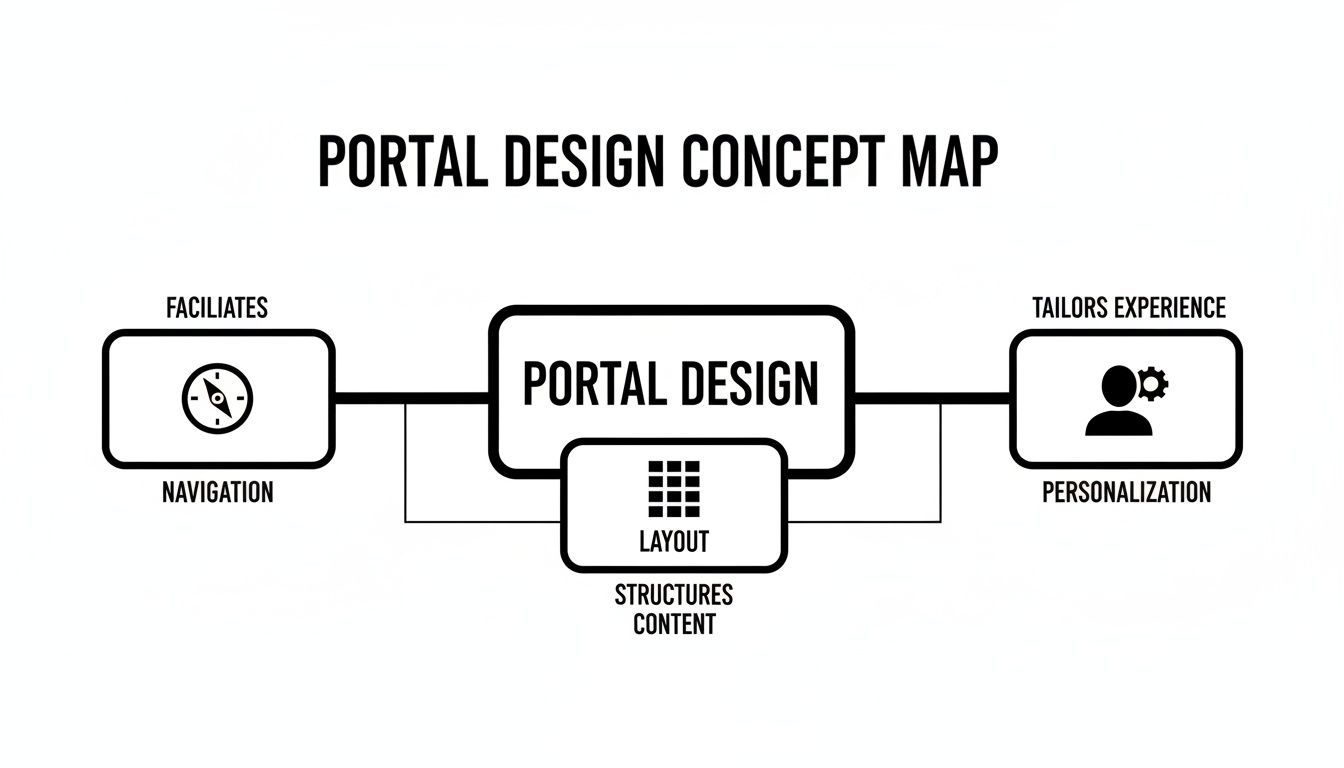
This visual breaks down how intuitive navigation, a clean layout, and deep personalization must work in harmony to build a cohesive and effective portal.
Leveraging Data for Smarter Operations
An integrated ecosystem doesn't just make things better for the customer; it also feeds invaluable data back into your operations. By analyzing how users actually interact with the portal, CX managers can start making smarter, data-driven decisions.
This trend is picking up speed. Self-service analytics is a major force in the Middle East & Africa's data analytics market, which is currently valued at USD 5 billion. In hubs like the UAE, these portals empower both agents and customers to access performance metrics on their own. For operations directors at startups that outsource support, this integration is a game-changer, with data showing such portals can slash query resolution times by 40-50% while enabling scalable 24/7 coverage.
By connecting your self-service portal to your core operational tools, you stop seeing customer interactions as isolated events. Instead, you see a complete story, enabling your entire support organization—internal and external—to provide smarter, faster, and more empathetic service.
Measuring What Matters for Portal Success
Launching a self-service portal without knowing how to measure its performance is like driving blind. Sure, you're moving, but you have no idea if you're heading in the right direction. To prove your portal’s value, you need to look past simple vanity metrics like page views and lock in on the Key Performance Indicators (KPIs) that actually show its impact on your customers and your bottom line.
A solid measurement framework gives you actionable insights, showing you what’s working, what isn’t, and where to put your resources next. It turns your portal from a simple cost center into a strategic asset with a real, provable return on investment (ROI). The right data helps you build a compelling, evidence-backed case for continued support and development of your self-service strategy.
Key Metrics for Portal Performance
To really get a feel for your portal's effectiveness, you need to track a specific set of KPIs that tie directly to customer satisfaction and operational efficiency. These metrics tell a story about how users behave and whether the portal is truly helping them solve problems on their own.
Here are the most critical KPIs to keep an eye on:
- Ticket Deflection Rate: This is the big one. It calculates the percentage of potential support tickets that were completely avoided because customers found answers themselves through the self-service portal.
- Customer Satisfaction (CSAT) Score: You have to measure satisfaction specifically related to the portal experience. Simple post-interaction surveys asking, "Did this article solve your problem?" give you direct feedback on how useful your content is.
- Knowledge Base Effectiveness: This means tracking metrics like search success rate (how often users find what they’re looking for) and the ratio of positive to negative ratings on your articles. A high success rate tells you your content is both relevant and easy to find.
Tracking these KPIs gives you a clear, quantitative view of how well your portal is achieving its main goal: empowering your users.
Tracking portal performance isn't just about operational tweaks; it's about proving its value to the business. The table below breaks down the essential metrics you need to monitor.
Key Metrics for Self Service Portal Performance
| Metric (KPI) | What It Measures | Industry Benchmark |
|---|---|---|
| Ticket Deflection Rate | The percentage of customer issues resolved via the portal without needing an agent. | 15-25% deflection is a strong starting point. |
| Customer Satisfaction (CSAT) | How satisfied users are with the portal experience, measured via post-interaction surveys. | >75% positive feedback on portal content. |
| Search Success Rate | The percentage of user searches that result in a click on a relevant knowledge base article. | Aim for >80%. |
| First Contact Resolution (FCR) | The percentage of issues fully resolved within the portal on the user's first attempt. | Strive for >70% for common issues. |
| Time to Resolution | The average time it takes for a user to find a solution on their own through the portal. | Should be significantly lower than agent-assisted channels. |
These benchmarks provide a target to aim for, helping you gauge your portal's effectiveness against industry standards.
Calculating Your Portal's ROI
Beyond the day-to-day operational metrics, demonstrating financial value is crucial for getting ongoing investment. A straightforward Return on Investment (ROI) calculation can powerfully illustrate your portal's contribution to the business.
The core of a portal's ROI lies in its ability to reduce the cost-to-serve. Every issue resolved through self-service is a direct saving compared to the higher cost of a live agent interaction.
To calculate your portal's ROI, you need to quantify its financial impact. Start by figuring out the average cost of handling a support ticket through a live channel like phone or email. Then, multiply your ticket deflection number by this cost to see your total savings.
For example, if your average cost per ticket is £15 and your portal deflects 2,000 tickets a month, your monthly savings are a cool £30,000. By comparing this saving to what it costs to maintain and improve the portal, you can calculate a clear ROI that justifies its existence and guides future investment. This data-driven approach turns your self-service portal into a proven business asset.
Building Trust with Security and Compliance

In a world where data breaches are front-page news, a secure self-service portal isn't just a nice-to-have feature—it's the very foundation of customer trust. Every time a user logs in to check an order, update a payment method, or view their personal history, they’re placing enormous faith in your ability to keep their data safe.
One slip-up can shatter that trust in an instant, leading to lost customers and a damaged reputation that takes years to repair.
For leaders in CX and operations, this makes security a non-negotiable. Your portal has to be built like a fortress from the ground up, ensuring every single interaction is locked down. This becomes even more critical when you bring outsourced partners into the mix, as you need ironclad security standards across the entire support ecosystem to protect both your customers and your company.
Your Essential Security Checklist
Protecting customer data isn't about building a single wall; it's about creating a layered defense system. Think of it as a series of checkpoints that verify identity and shield information at every turn. If one layer is somehow breached, the others are there to stop an intruder in their tracks.
Here’s a practical checklist of security measures that are absolutely fundamental for any trustworthy self-service portal:
- Multi-Factor Authentication (MFA): This is the modern baseline. Requiring a second piece of proof—like a code sent to a phone or a fingerprint scan—makes it dramatically harder for unauthorized users to get in, even if they’ve stolen a password.
- End-to-End Data Encryption: All data must be scrambled and unreadable, period. This applies whether it's just sitting on a server (at rest) or moving between the user's device and your portal (in transit). Without the right key, it’s just gibberish to prying eyes.
- Regular Security Audits: You have to proactively hunt for weaknesses. Running regular penetration tests and security audits helps you find and patch vulnerabilities before a hacker has the chance to exploit them.
- Strict Access Controls: Not everyone needs access to everything. Implement role-based access control (RBAC) so employees and partners can only see the specific customer data required for their job. This "principle of least privilege" is one of the smartest ways to minimize your internal risk.
Security isn't a one-time setup; it's a continuous commitment. A secure portal demonstrates respect for your customers' privacy, transforming a potential vulnerability into a powerful tool for building lasting loyalty.
Navigating Global Compliance Standards
On top of the technical defenses, your portal must operate within a complex web of regional data protection laws. Compliance isn’t optional—it’s a legal mandate, and the penalties for getting it wrong can be staggering.
A few of the big regulations you'll need to watch for include:
- GDPR (General Data Protection Regulation): If you have any users in the European Union, you must follow its strict privacy rules, including things like the "right to be forgotten."
- CCPA/CPRA (California Consumer Privacy Act/Privacy Rights Act): These laws give California residents significant control over how their personal information is used.
- Regional Data Sovereignty Laws: Many countries now legally require their citizens' data to be stored on servers physically located within their borders.
The Future of Secure Identity
New technologies are on the horizon that will give users even more power over their data, further strengthening portal security. Self-sovereign identity (SSI) is a concept that's rapidly gaining traction, allowing people to manage their own digital identities without needing a central company to vouch for them.
This decentralized model is picking up serious steam. The Middle East and Africa SSI market, which is closely tied to secure self service portal applications, is expected to explode from USD 86.42 million in 2024 to an incredible USD 2,021.18 million by 2030.
This growth is all about the demand for user-controlled access, which is a game-changer for BPO security. For example, some fintech firms in the UAE are already testing SSI to let customers onboard themselves with mobile wallets, a move that has been shown to cut fraud by as much as 70%. You can dive deeper into the research driving this secure identity market growth to see where things are headed.
Common Self Service Portal Questions
As you start planning and rolling out a self service portal, a few questions always seem to pop up. Leaders worry about everything from driving adoption to justifying the cost for a smaller company. Getting these common challenges right is the key to a successful launch.
Let's walk through some clear, direct answers to help you make the right calls and sidestep the usual pitfalls. The most important thing to remember is that your portal isn't a static website—it's a dynamic product that needs promotion and constant care. If you build it and just hope customers show up, you're in for a disappointment.
How Do I Get Customers to Actually Use the Portal?
The secret to driving adoption is making your self service portal the path of least resistance. It has to be faster, easier, and more convenient than picking up the phone or shooting off an email. When the experience is genuinely better, users will naturally start using it.
You have to actively promote it across all your communication channels. Train your support agents to be portal advocates, guiding customers to it for simple, repetitive questions.
Here are a few practical steps to get you started:
- Promote it everywhere: Add a prominent link to the portal in your email signatures, on-hold messages, and even on your invoices.
- Train your team: Teach agents to gently redirect customers with straightforward questions to the portal. Frame it as a faster way for them to get answers next time.
- Make it the best option: Above all, make sure the portal delivers. A fast, intuitive user experience that solves problems efficiently is the most powerful magnet for adoption.
If your portal resolves an issue in two minutes flat while a phone call takes ten, you’ve created a compelling reason for customers to self-serve. Efficiency is your best marketing tool.
What Is the Biggest Mistake to Avoid When Launching?
The single most common mistake is treating the portal as a one-and-done project. A successful portal is a living, breathing part of your support ecosystem, and it demands continuous attention and improvement. Launching it and then walking away is a recipe for failure.
Think about it: content gets stale, customer needs shift, and new problems always crop up. If you neglect to update your knowledge base, ignore user analytics, or fail to act on customer feedback, your portal will quickly become irrelevant. Instead of being a helpful tool, it turns into another source of customer frustration, undermining the very trust you're trying to build. The launch is the starting line, not the finish.
Is a Self Service Portal Worth It for a Small Business?
Absolutely. For a startup or a small business, a self service portal acts as a powerful force multiplier. It allows a lean support team to handle a rapidly growing customer base without having to scale headcount at the same frantic pace.
By deflecting common and repetitive questions, the portal frees up your limited staff to focus on what really matters: handling the complex issues and engaging in the high-touch interactions that drive growth and build loyalty. It’s a strategic investment in scalability, enabling you to provide excellent 24/7 support without the massive overhead.


