
What Is Client Database Software

Let's stick with a simple analogy. Imagine your business is a smart library. Each customer is a unique book with its own story, preferences, and history. A basic spreadsheet is like a simple catalog—it might list titles and authors, but that's about it.
In contrast, client database software is the expert librarian who knows every single book intimately.
This "librarian" remembers which books have been checked out, what topics a patron prefers, and even the notes they've scribbled in the margins. It can recommend the perfect next read, find related authors, and make sure every visitor feels completely understood. That's the real job of a client database: to move beyond simple data storage and start building meaningful, context-aware relationships.
Beyond a Simple Address Book
At its heart, this software is designed to capture and centralize every piece of information you have about a client. And we're not just talking about names and email addresses. A powerful database pulls in various data streams to paint a complete picture of who your customers are.
Here's a quick look at the kind of information it manages:
- Contact and Demographic Data: The basics like name, email, phone number, location, and company details.
- Interaction History: A running record of every call, email, chat session, and meeting.
- Purchase History: A complete log of all transactions, returns, and order values.
- Customer Feedback: Key insights from surveys, support tickets, and direct conversations.
This unified profile gives every team, from sales to support, the full context of a customer's journey. An agent answering a support call can instantly see past purchases and previous issues, leading to faster, more effective resolutions. The ability to build relationship-oriented organizations is what separates truly successful companies from the pack.
By consolidating all customer interactions and data into a single, accessible repository, businesses can deliver a consistent and personalized experience across all touchpoints, which is critical for fostering long-term loyalty.
The shift toward these tools is happening fast. The MEA enterprise software market, which includes client database software, is projected to jump from USD 8,592.6 million in 2025 to a staggering USD 14,923.3 million by 2035. This massive investment shows just how much value businesses see in centralizing customer data to improve service and efficiency. You can see more details in the full MEA enterprise software market report.
Ultimately, client database software is the foundation on which exceptional customer experiences are built. It's how you turn raw data into lasting relationships.
Client Database Software vs Traditional Spreadsheets
It’s easy to think a spreadsheet can do the job, but the difference is night and day. Here’s a quick rundown of why dedicated software leaves manual methods in the dust.
| Feature | Spreadsheet (Manual) | Client Database Software (Automated) |
|---|---|---|
| Data Centralization | Data is often fragmented across multiple files and users. | Creates a single source of truth accessible to all teams. |
| Real-time Updates | Prone to version control issues; updates are manual. | Information is updated instantly across the entire system. |
| Automation | Lacks automation; requires manual data entry and updates. | Automates data capture, task reminders, and workflows. |
| Integration | Limited or no integration with other business tools. | Seamlessly connects with CRM, email, and support platforms. |
| Security | Basic password protection; vulnerable to unauthorized access. | Advanced security with role-based access and encryption. |
| Scalability | Becomes slow and unwieldy as data volume grows. | Designed to handle millions of records without performance loss. |
| Reporting & Analytics | Manual and time-consuming report creation; limited insights. | Built-in analytics provide deep insights into customer behavior. |
While spreadsheets might work for a tiny handful of clients, they quickly become a liability as you grow. A proper client database is built for scale, security, and smart decision-making, giving your team the tools they actually need to succeed.
Core Features That Power Great Customer Experiences
When we talk about client database software, it's easy to get lost in a generic checklist of features. But the real value isn’t just in what the software does, but in how those features directly impact your team's day-to-day work and, ultimately, your customer interactions. These aren't just tools for storing data; they're for making that data actually work for you, turning raw information into smoother, more personal customer journeys.
The whole point is to shift from knowing who a customer is to understanding their entire story with your company. When every team member, from sales to support, has that full context, they can deliver exceptional service. Imagine automatically routing a high-value client to your most seasoned agent or sending a targeted follow-up to everyone who reported a specific bug—this is what the right features unlock.
Seamless Contact Management and Unified Profiles
At the very heart of any good system is the ability to create a 360-degree view of every single customer. This is so much more than just a name and an email address. A unified profile is a living, breathing record that pulls together every touchpoint into one clean, accessible place.
Think of it as a dynamic file on each customer relationship. It should effortlessly consolidate:
- Basic Information: Name, company, title, and contact details.
- Interaction History: A complete log of every call, email, support ticket, and chat session.
- Transaction Data: A full history of purchases, returns, subscription status, and lifetime value.
- Behavioral Insights: How they use your products or services and their engagement with marketing content.
This centralization demolishes data silos. That's a huge deal, especially when 76% of consumers say they expect consistent interactions across departments but rarely get them. When your support agent can instantly see a client’s recent purchase and past support tickets, they can solve problems faster and with more confidence.
Powerful Segmentation and Targeting
Once you have all this rich data in one place, the next step is to use it with precision. Segmentation is the feature that lets you group customers based on shared traits, behaviors, or history. This is how you move from generic, one-size-fits-all communication to messages that actually resonate.
For instance, you could quickly build segments for:
- High-value customers who have spent over a specific amount.
- New clients who signed up in the last 30 days.
- Users who have reported a particular technical issue.
- Customers who haven't made a purchase in over six months.
By organizing customers into these meaningful groups, you can tailor marketing campaigns, support initiatives, and product updates to what they actually care about. This level of personalization is no longer a nice-to-have; it's what modern consumers expect.
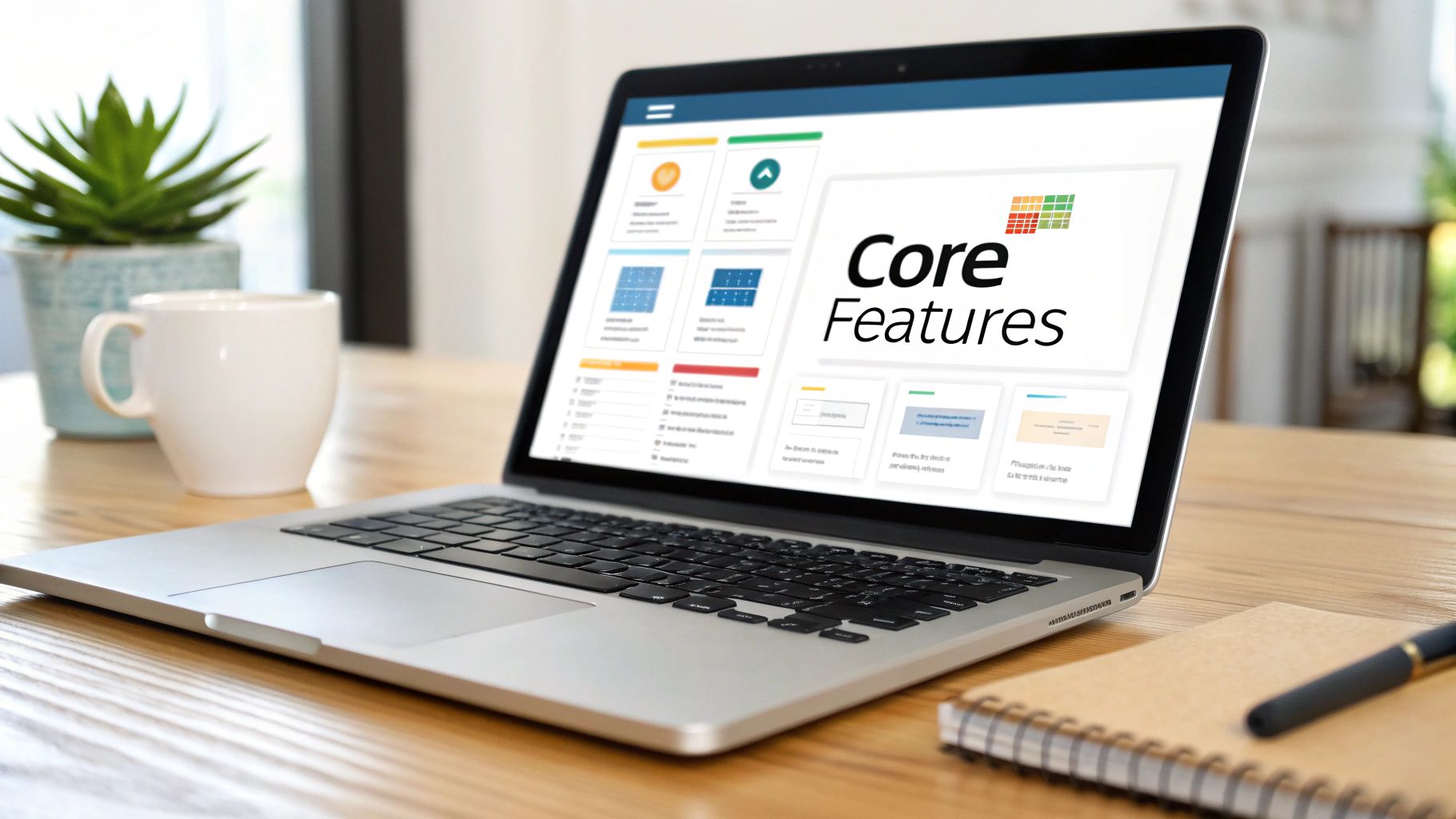
A well-organized dashboard gives your team a quick, at-a-glance view of key metrics and activities, making it easier to spot trends and make strategic decisions on the fly.
Automation and Workflow Management
The final piece of the puzzle is automation. The best client database software takes the repetitive, manual tasks off your team's plate, freeing them up to focus on high-value activities that genuinely need a human touch. This is where you’ll see massive efficiency gains.
You can set up workflows that trigger specific actions based on certain events. For example:
- Onboarding Sequences: When a new customer is added, the system can kick off a series of welcome emails and automatically schedule a follow-up call for an account manager.
- Support Ticket Routing: A ticket containing keywords like "billing issue" can be instantly routed to the finance department, no questions asked.
- Task Reminders: The software can create and assign tasks to team members, like reminding a sales rep to check in with a lead after seven days of inactivity.
These automated processes ensure nothing falls through the cracks. They introduce consistency, reduce the risk of human error, and make your entire operation far more scalable. By combining a unified customer view, precise segmentation, and smart automation, your client database software becomes the engine that drives truly memorable customer experiences.
Integrating Your Database Into Your CX Tech Stack
Your client database software can't just be a digital filing cabinet sitting in a corner. A standalone system, no matter how powerful, ends up creating information silos that frustrate your team and, even worse, your customers. The real magic happens when your database becomes the central hub of your entire customer experience (CX) tech stack, tying every tool and team together.
Think of it like a classic 'hub-and-spoke' model. Your client database software is the hub, the single, authoritative source of truth about your customers. Every other platform you use—your CRM, your contact center software, your helpdesk—is a spoke plugged directly into that hub. This setup ensures that when data gets updated in one place, it’s instantly available everywhere else.
This integrated approach puts an end to that all-too-common scenario where the sales team sees one version of a customer's history while the support team sees something completely different. It creates a seamless flow of information that gives every employee the context they need to have smart, relevant conversations.

Connecting to Your CRM System
For most businesses, the client database is the rock-solid foundation that their Customer Relationship Management (CRM) system is built on. The CRM pulls rich information from the database to manage sales pipelines, track leads, and forecast revenue. When the two are properly integrated, data flows both ways.
A new lead captured by a sales rep in the CRM is instantly created as a new contact in the central database. On the flip side, a support ticket logged in the helpdesk updates that customer's profile, giving the sales team a heads-up about recent service issues before they make their next call.
This synergy aligns sales and service, transforming your CRM from a simple sales tool into a platform for managing the entire customer relationship. You can discover more about the essential customer service tools that complete your stack in our detailed guide.
Powering Your Contact Center and Helpdesk
The connection with your contact center and helpdesk software is where your team will feel the most immediate impact. When a customer calls or sends an email, the system can instantly pull up their entire history from the database.
The result is a seamless customer journey where agents have full context for every interaction, completely eliminating the frustration of customers having to repeat their name, account number, and issue every time they speak to a new agent.
This integration is the engine behind several critical functions:
- Intelligent Call Routing: High-value customers or those with urgent, open tickets can be automatically sent to senior agents.
- Screen Pops: The customer's complete profile pops up on the agent's screen the second an interaction begins.
- Automated Ticket Creation: Details from calls and chats are automatically logged as tickets and tied to the right customer profile.
This unified view doesn't just make things more efficient; it dramatically improves the quality of customer service. Agents are better prepared to solve problems on the first contact, which is a huge driver of customer satisfaction and loyalty.
Creating a Single Source of Truth
Ultimately, the goal of all this integration is to establish a single source of truth across your entire organization. This reliable, centralized data is becoming non-negotiable. Across the Middle East, the software market—including essential client database software for CRM and customer strategies—is projected to hit USD 32.005 billion in sales revenue for 2025, with a projected CAGR of 12.135% through 2033. This growth highlights the demand for robust data management, especially in sectors like banking and telecom that require 24/7 coverage and strict compliance.
When every department is working from the same playbook, your business just operates better. Marketing can build targeted campaigns based on real purchase and service data. Product teams can spot trends from support tickets. And leadership gets a clear, accurate view of the entire customer lifecycle. This connected ecosystem turns your client database from a simple repository into the strategic heart of your business.
Navigating Data Security and Compliance
When you collect customer information, you're not just managing data—you're handling trust. In the world of customer experience, that trust is your most valuable asset. A data breach or compliance failure can shatter it in an instant, leading to costly fines, a damaged reputation, and lost business.
This is why robust security and compliance features are non-negotiable in any client database software. Think of these features as a digital fortress you build around your customer data. It’s not about locking everything down so it’s unusable. Instead, it’s about creating smart, layered defenses that protect sensitive information while still giving your team the access they need to do their jobs.
Building Your Digital Fortress
The first layer of defense is data encryption. This process acts like a secret code, scrambling your data so that if anyone unauthorized ever gets their hands on it, the information is completely unreadable and useless. Encryption needs to apply to data both "at rest" (when it's stored on servers) and "in transit" (when it's moving between your systems).
Next up is controlling who can see and do what within the software. This is managed through role-based access controls (RBAC). Just as a bank gives a teller different access levels than a branch manager, RBAC lets you define permissions based on an employee's job. A customer service agent might need to view and update contact records, but only a manager should be able to delete them.
This principle of "least privilege"—giving users only the access they absolutely need—is a cornerstone of modern data security. It dramatically minimizes the risk of both accidental data loss and malicious activity.
Maintaining Oversight and Accountability
Even with strong defenses in place, you need to see what's happening inside your database. This is where audit trails and activity logs come in. An audit trail is a detailed, chronological record of every single action taken: who logged in, what records they viewed, what changes they made, and when they did it.
An audit trail provides complete transparency and accountability. In the event of a security incident or a customer dispute, it gives you an irrefutable record of what happened, allowing you to investigate quickly and take the right action.
This level of oversight isn't just a best practice; it's often a legal requirement. Many regional data protection laws, like GDPR in Europe or various regulations across the GCC, mandate that businesses keep clear records of how customer data is handled. For a deeper dive into these responsibilities, especially when working with external teams, check out our guide on navigating data security and compliance in outsourced customer service.
Key Security Questions for Any Vendor
When you're evaluating client database software, don't just take a vendor's security claims at face value. You need to ask specific, probing questions to truly understand how they'll protect your data.
Here’s a straightforward checklist to guide those conversations:
- Encryption Standards: What specific encryption methods do you use for data at rest and in transit?
- Access Controls: How granular are your role-based access controls? Can we customize permissions for different teams and user levels?
- Data Location: Where will our data be physically stored? Do you offer data residency options to comply with local regulations?
- Compliance Certifications: What industry-standard security certifications (like ISO 27001 or SOC 2) do you hold?
- Breach Notification Protocol: What is your process for notifying us in the event of a security incident or data breach?
Choosing a partner with a transparent and robust security posture is one of the most important decisions you'll make. It protects your customers, your reputation, and your business from significant and unnecessary risk.
How to Choose the Right Client Database Software
Picking the right client database software can feel like a massive undertaking. But with a structured approach, you can cut through the noise and make the process totally manageable. The goal isn't to find some mythical "perfect" platform, but to find the one that actually fits your business, your team, and where you're headed.
If you rush this decision, you're setting yourself up for buyer's remorse, low user adoption, and a tool that ends up creating more headaches than it solves.
Think of it this way: you wouldn't build a house without a blueprint. The same logic applies here. Before you even look at a single vendor, you need to map out exactly what your ideal solution looks like. This initial work ensures you’re evaluating options based on your real requirements, not just a flashy sales pitch. It lets you compare platforms objectively and make a smart, data-backed choice.
Define Your Unique Business Needs
Before you get tempted by feature lists, you need to get crystal clear on what you're trying to fix or improve. Start by walking through your current customer journey. Where are the biggest friction points for your team? For your customers? Is data scattered across a dozen spreadsheets? Are support agents flying blind during calls, missing key context?
Answering these questions helps you build a checklist of your non-negotiables. Think about these core areas:
- Team Size and Structure: How many people need access right now? What about in two years? You'll also need to consider different roles—sales, support, management—and what level of access each of them truly needs.
- Essential Integrations: Make a list of the tools your business can't live without. This could be your email platform, helpdesk software, or accounting system. Seamless integration is what turns a database into a true single source of truth.
- Data Requirements: What information is critical for you to track? If you're a B2B company, you might need to link multiple contacts to a single company account. A B2C retailer, on the other hand, will probably focus more on individual purchase history and loyalty data.
Getting this groundwork right is crucial. The market for the database management systems that power these tools is booming—in the Middle East and Africa (MEA) alone, it hit USD 7.0 billion in 2024 and is expected to reach USD 16.1 billion by 2030. This growth shows just how much companies are investing in data-driven strategies. A clear understanding of your needs ensures your investment actually pays off. You can discover more insights about the MEA database market and see the full picture.
Evaluate Scalability, User Friendliness, and Security
Once you've defined your needs, you can start the real evaluation. It’s important to look beyond the immediate features and think about how a platform will hold up over time. A tool that’s perfect for a team of five might completely fall apart under the pressure of fifty. Scalability is all about making sure the software can grow with your business without tanking in performance or hitting you with a massive price hike.
Just as important is the user experience (UX). A system can have all the power in the world, but if your team finds it too complicated, it’s useless. Look for an intuitive interface, clean navigation, and a learning curve that isn’t a vertical cliff. The best way to judge this is to get your actual team members involved in free trials and live demos so they can get their hands on the software.
The platform you choose must be adopted enthusiastically by your team. If it's clunky, slow, or confusing, they'll inevitably find workarounds, and you'll be right back to dealing with fragmented data silos.
Finally, you need to circle back to security with a critical eye. Every vendor will say they're secure, but you need to dig deeper. This simple decision tree shows some of the fundamental security questions you should be asking.
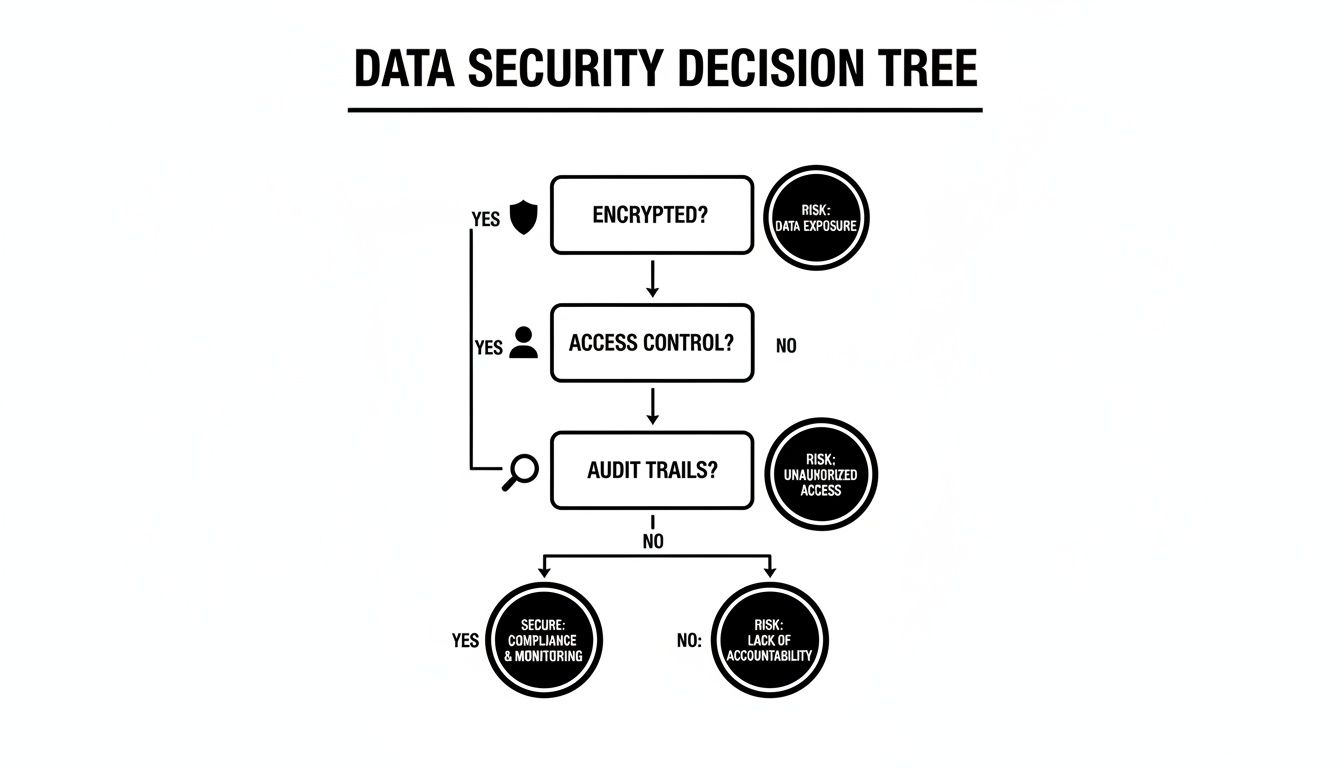
As the visual shows, real security isn't just one feature. It’s a combination of encryption, smart access controls, and transparent audit trails all working together to protect your most valuable asset: your customer data.
Create a Vendor Scoring Matrix
To make your final decision as objective as possible, it's time to build a scoring matrix. This is a simple but incredibly powerful tool that helps you compare vendors side-by-side using a weighted system that reflects your unique priorities.
Start by listing your key criteria in a spreadsheet. Then, assign a "weight" to each one based on how important it is to your business (e.g., on a scale of 1-5, with 5 being a must-have). As you demo and evaluate each vendor, give them a score for how well they meet each criterion (e.g., on a scale of 1-10).
Vendor Evaluation Scoring Matrix
| Evaluation Criterion | Weight (1-5) | Vendor A Score (1-10) | Vendor B Score (1-10) | Weighted Score |
|---|---|---|---|---|
| Core Functionality | 5 | 9 | 7 | A: 45, B: 35 |
| Ease of Use (UX) | 5 | 7 | 9 | A: 35, B: 45 |
| Integration Capabilities | 4 | 8 | 8 | A: 32, B: 32 |
| Scalability | 4 | 9 | 6 | A: 36, B: 24 |
| Security & Compliance | 5 | 8 | 8 | A: 40, B: 40 |
| Reporting & Analytics | 3 | 7 | 9 | A: 21, B: 27 |
| Customer Support | 3 | 9 | 7 | A: 27, B: 21 |
| Pricing & TCO | 4 | 6 | 8 | A: 24, B: 32 |
| Total Weighted Score | A: 260, B: 256 |
The final step is to multiply each score by its assigned weight to get a weighted score for each vendor. The vendor with the highest total weighted score is, on paper, your best fit. This data-driven approach removes emotion and bias from the equation, ensuring your choice is a strategic one that will serve your business for years to come.
Got Questions About Client Database Software?
Even when you have a solid grasp of the features and benefits, some practical questions always pop up when you're looking at new tech. Thinking about a client database software solution means figuring out how it will slot into your existing workflows and what the transition will actually feel like for your team.
Let's tackle some of the most common questions we hear from business leaders. We’ll give you straightforward answers to help you wrap up your decision-making process with confidence.
What Is the Main Difference Between This and a Full CRM System?
Think of it like an engine versus a complete car. A client database software is the powerful, essential engine. Its entire job is to store, organize, and pull up customer data securely and efficiently. It’s the rock-solid foundation for everything you know about your customers.
A full CRM system is the entire car built around that engine. It includes the database, of course, but it bolts on a lot of other features—sales pipeline management, marketing automation campaigns, and complex analytics dashboards. For a lot of businesses, especially those focused on service, having a powerful database with great integrations is the most important piece of the puzzle.
How Difficult Is Migrating Data From Spreadsheets?
Honestly, the difficulty really depends on two things: the software vendor you choose and how clean your existing data is. Most reputable providers have tools and dedicated support teams to help with data migration. The real secret to a smooth switch, though, is the prep work you do on your end.
Before you even think about migrating, you need to ‘clean’ your spreadsheet data. That means getting rid of duplicates, standardizing formatting for things like phone numbers and addresses, and making sure all your columns are properly labeled. This groundwork is the single biggest factor in a successful launch.
Can This Software Handle Both B2B and B2C Data?
Absolutely. Any flexible client database software is built to handle both B2B and B2C models. It does this with customizable fields and data structures, which is a must-have for businesses that serve different kinds of markets.
For your B2C clients, you might track individual details like:
- Personal purchase history
- Loyalty point balances
- Communication preferences (e.g., email vs. SMS)
For your B2B accounts, you can create a record for the entire company and then link multiple contacts to that main account. This setup lets you track conversations with different people—say, a technical contact and a billing contact—while still keeping a complete, organized view of the entire client relationship.